On-Chain Inheritance Update: No Single Point of Failure, Plus Custom Fallbacks
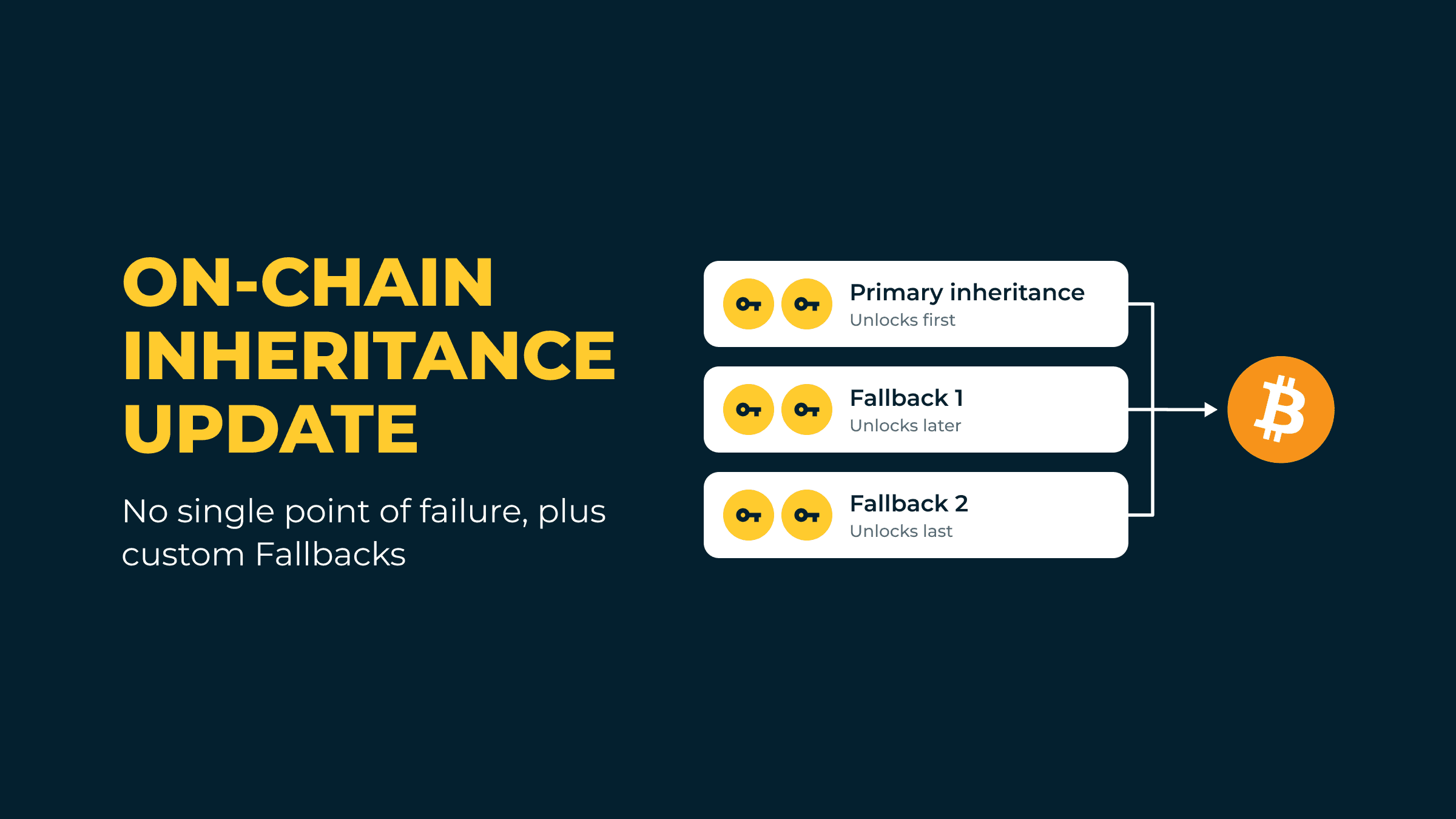
This post covers the latest changes to our on-chain timelock inheritance protocol, made in response to the recent wave of security incidents involving hardware signing devices. For the latest on our off-chain protocol, see Bring Your Own Hardware: How Nunchuk's Off-Chain Timelock Inheritance Works.
Why now: the device became the weak point
2026 was a hard year for hardware signing devices. Implants were slipped into devices on their way to buyers, a firmware bug made seeds predictable, and attackers stole the key that proves a device is genuine. In each case, the owners did nothing wrong.
| Date | Device | What happened |
|---|---|---|
| Nov 2026 | Trezor Safe 5 | A listening implant in units sold by the reseller CryptoBilis copied recovery words off the screen. (Trezor) |
| Oct 2026 | Keystone | An attacker stole the key that proves Keystone devices are genuine, so a counterfeit could pass the check. (The Hacker News) |
| Oct 2026 | Ledger | An implant in devices sold by the same reseller captured recovery phrases during setup. Estimates put losses at $86M to $93M. (CoinDesk, Halborn) |
| Jul 2026 | Coldcard Mk3 | A firmware bug made seed generation predictable, and attackers swept about 1,816 BTC. (TRM Labs, CoinDesk) |
These weren't the first, either: in 2024 we wrote about Dark Skippy. The lesson each time is that no single device should be trusted with everything.
Multisig follows that rule for normal spending, which always needs at least two keys. But the previous on-chain default relaxed it for inheritance: once the timelock passed, any one of your keys could spend alone. A key that can move your funds on its own is a single point of failure, even if it only gains that power after the timelock. And the risk peaks when your Beneficiary claims, because they'll likely set up a new device to do it, which is exactly when these attacks strike.
Change 1: two keys to claim, so one compromised key isn't enough
After the timelock, the inheritance route now needs two keys instead of one. Here's how that looks in a Honey Badger plan:
| Route | Keys needed | Is one compromised key enough? |
|---|---|---|
| Normal spending, any time | 2 of 4: your three keys and Nunchuk's Platform key | No |
| Inheritance, previous default | Any one of your three keys | Yes |
| Inheritance, new default | Any 2 of 4: your three keys and a dedicated inheritance key | No |
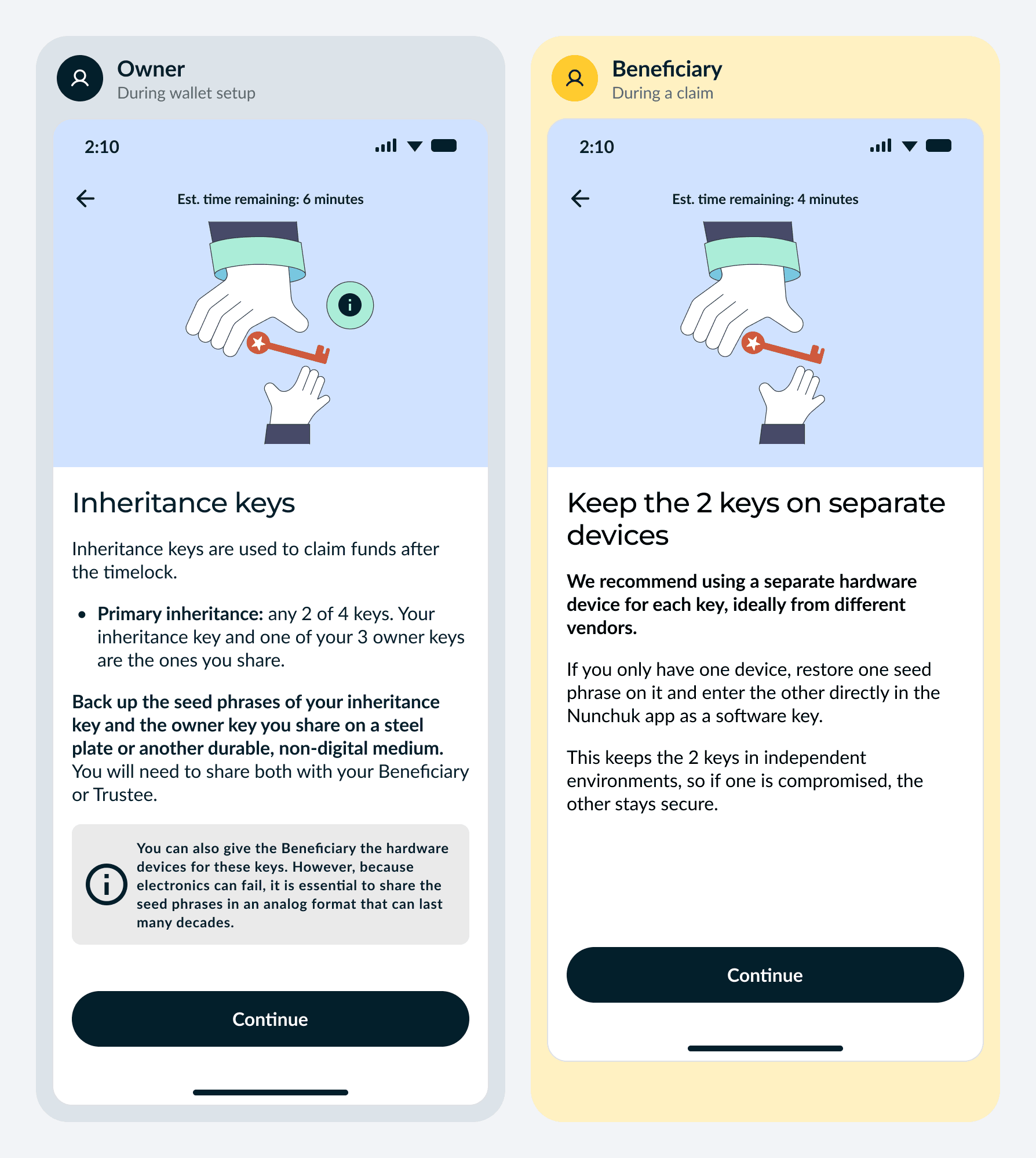
Your Beneficiary receives the dedicated inheritance key and one of your three keys. That pairing ensures the inheritance can't be accessed before the date you choose. After that date, the Platform key plays no part in a claim, so Nunchuk can't block one.
Keep the two keys apart: The protection holds as long as the two keys stay on separate devices, so the app recommends a separate hardware signing device for each, ideally from different vendors. If your Beneficiary has only one device, the Nunchuk app on a secure phone can be the second. Kept apart, one compromised device exposes only one key. That's a meaningful safety margin for a Beneficiary who isn't technical, since a tampered device is hard to spot.
The tradeoff: one more key to keep safe
Your Beneficiary now keeps two seed phrases instead of one. A 12-word seed phrase is enough for each; store each on durable media such as steel, and keep the two apart. If they lose one, they'll need another of your keys, or a Fallback, to claim.
For you as the owner, setup adds a fourth key: a dedicated inheritance key that only works after the timelock.
That's a small price for knowing that one compromised key can't take what you leave behind.
Change 2: Fallbacks, a chain of backup plans
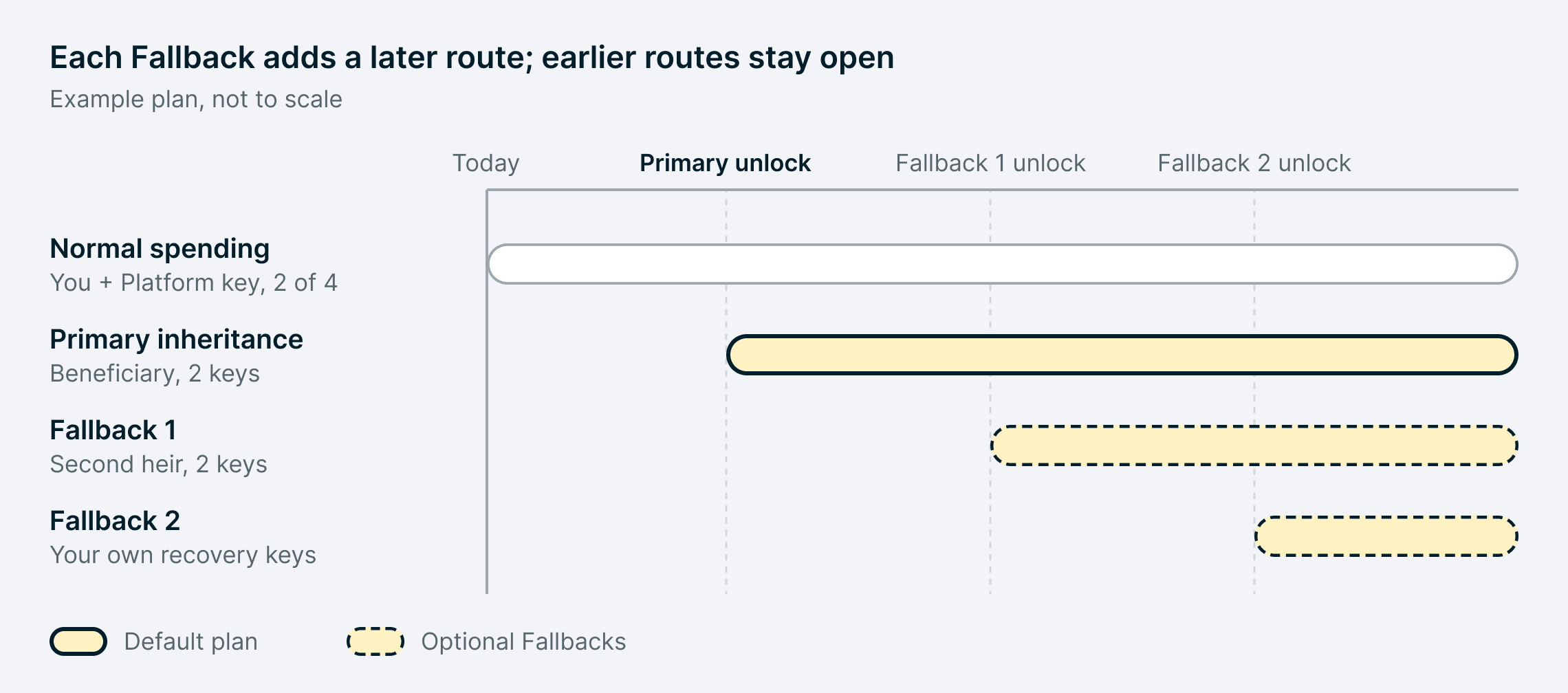
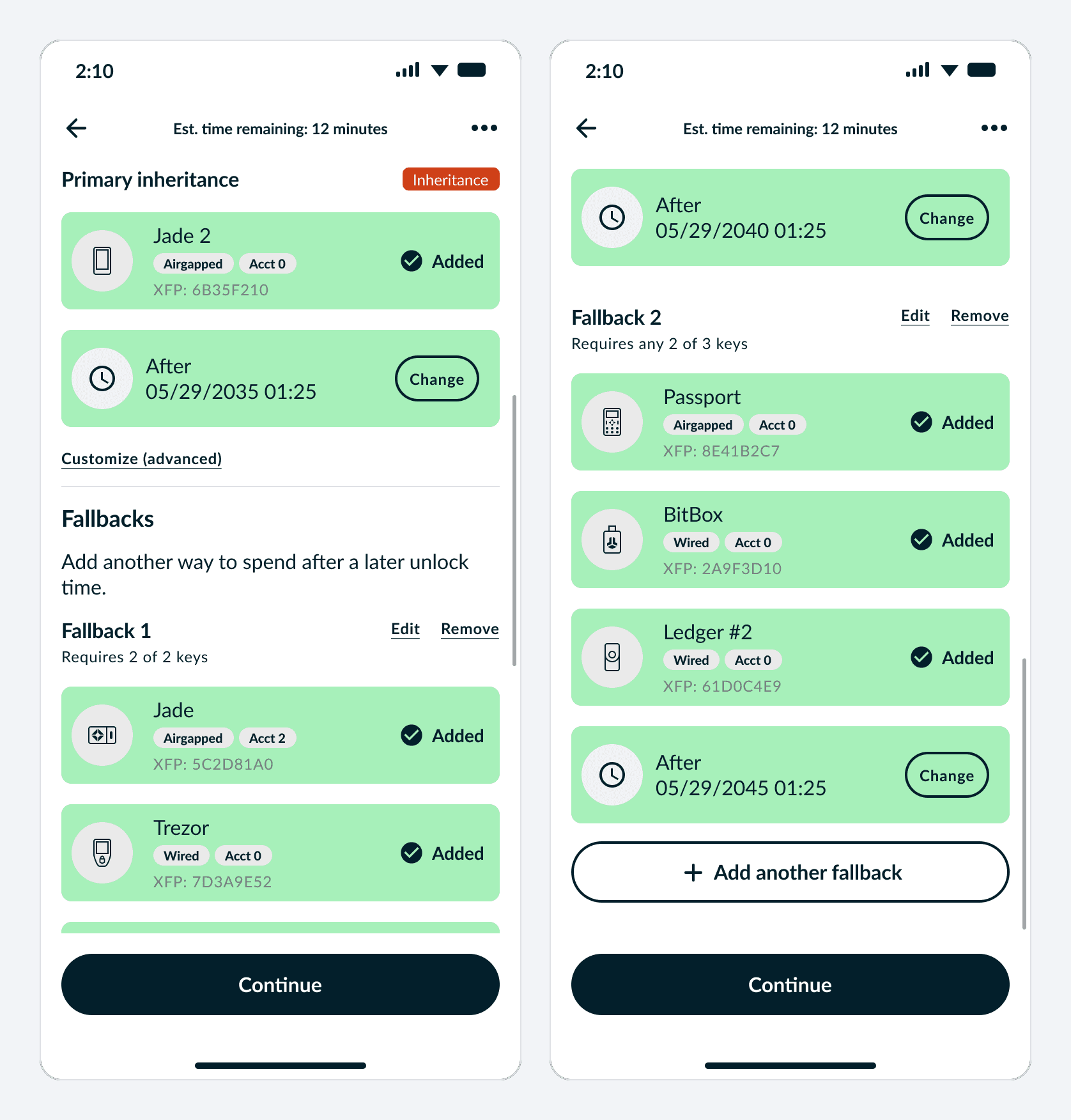
This update also introduces Fallbacks: optional, extra ways to claim that unlock later than your primary inheritance, one after another. The default plan is complete without them. Each Fallback adds one more layer of insurance in case the route before it can't be used.
- Each Fallback has its own keys and its own unlock time, and you choose how many of its keys must sign.
- A Fallback adds a route without closing earlier ones. No route reserves a share: whichever route is used first can spend the whole wallet.
- Bitcoin enforces every unlock time, so nobody has to be around to honor the plan.
What you can use them for:
- A second heir: Another family member, who can claim later if your first Beneficiary can't.
- Lost keys: Your Beneficiary loses one of their two keys, for example a seed phrase destroyed in a fire, and your own keys can't be found. A Fallback gives them a second set of keys, stored somewhere else, that unlocks later, so they can still claim.
- Your own recovery: Keys you hold yourself, in case you lose too many to spend normally.
- A last resort: A Trustee, such as an estate attorney, in case everyone before them can't claim.
Who gets notified: For each Beneficiary or Trustee, you choose which routes they get an email about when that route's timelock expires, and whether those emails include the wallet configuration file. That file lets them claim without Nunchuk, but it also shows them the wallet's balance and history.
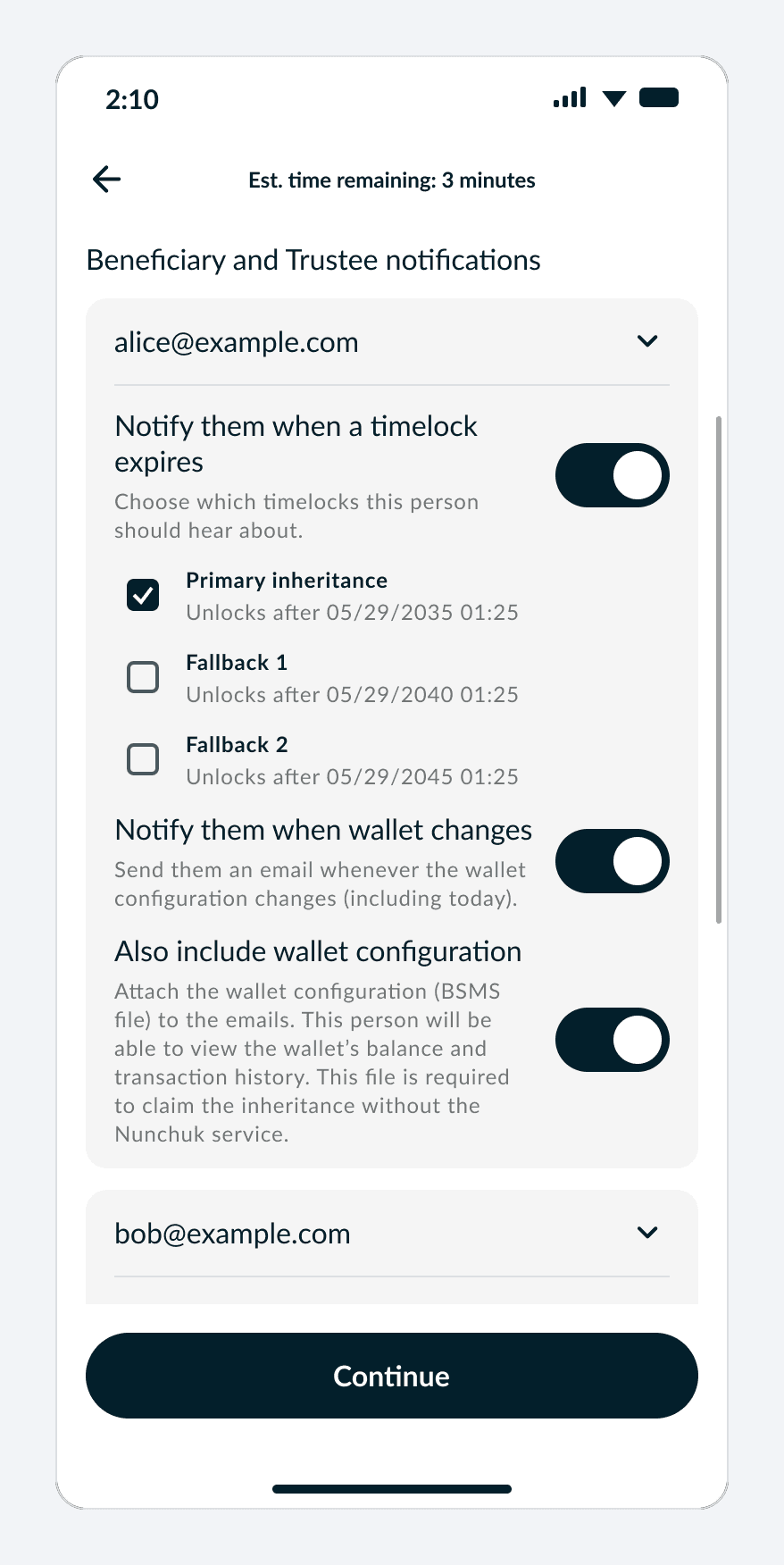
Customizing the primary route: With Customize (advanced), you can change how many keys the primary inheritance needs and which ones, including a single key as before. The app warns you about any route that needs only one key, since one compromised key could then claim through it.
On-chain or off-chain: choosing a protocol
Both protocols remain available. On-chain's strength is dual-path recovery; off-chain's is flexibility.
On-chain offers two ways to claim:
- Assisted: With the Magic Phrase, your Beneficiary claims through Nunchuk, with professional help from our team at every step.
- Self-sovereign: Once the timelock expires, they can claim on their own with the two keys, the wallet configuration file and open-source software such as Bitcoin Core (how it works).
Because Bitcoin enforces the timelock, the second path works even if we're no longer around (why that matters). The tradeoff is rigidity: changing the timelock or the keys means moving funds to a new wallet.
Off-chain offers flexibility: The timelock lives in the Platform key's co-signing policy, not in the wallet, so you can change it without moving funds. Phased Rollout can also split the inheritance among several heirs or release it in stages, for example 50% to each of two children, or 25% a year over four years.
The tradeoff is dependence on us: every claim needs the Platform key's signature, so a claim can't go through while our service is unavailable. Your own spending never depends on us, since enough of your own keys can always move your funds. That required co-signature has an upside too. Because the Platform key signs only after the timelock and with the Magic Phrase, off-chain never had the single-key gap.
| On-chain timelock | Off-chain timelock | |
|---|---|---|
| Who enforces the timelock | Bitcoin | Nunchuk's Platform key |
| Ways to claim | Assisted, or self-sovereign after the timelock | Assisted |
| Changing the timelock | Moves funds to a new wallet | No funds move |
| More than one heir | Fallbacks: later backup routes, not shares | Phased Rollout: percentage shares on a schedule |
| Hardware signing devices | Those that support Miniscript | A broader range |
| Can one compromised key claim? | No, in the default plan | No |
Choose on-chain if the plan must outlive any company, including ours. Choose off-chain if you want a simpler setup, broader hardware support, phased distribution, or a plan you expect to keep changing.
Best practices for hardware signing devices
As before, any key you hold can be a hardware signing device you already own. Two keys limit what one bad device can do, but every device is still worth protecting. The app shows these reminders when you add a key and when your Beneficiary claims.
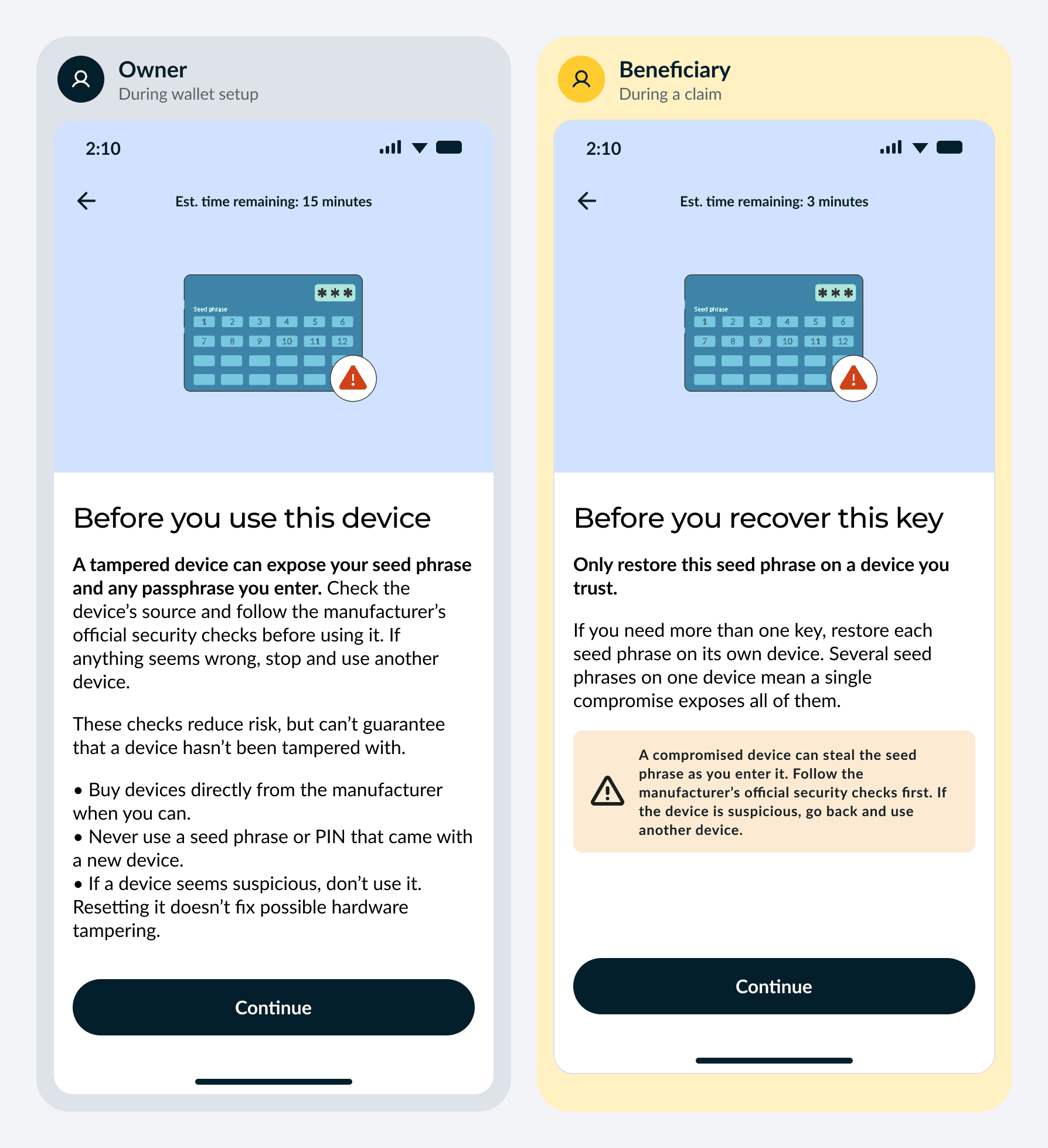
When you order a device: Customer lists leak. Ledger's 2020 breach exposed the names, home addresses and phone numbers of about 272,000 buyers (Ledger), and in January 2026 its payment partner Global-e leaked buyers' names and contact details again (The Block). A leaked order tells criminals who likely owns bitcoin and where they live.
- Buy directly from the manufacturer when you can.
- Ship to a PO box, parcel locker or pickup point, and use an email address you don't use anywhere else.
- Expect phishing after any leak. No manufacturer will ever ask for your seed phrase.
- Don't post photos of your devices or their packaging online.
When you set up a device:
- Never use a seed phrase or PIN that came with the device.
- Run the manufacturer's security checks before first use, knowing they can't guarantee a device is clean.
- Don't use a device that seems suspicious. Resetting it doesn't undo hardware tampering.
- If a vendor announces a flaw in how its devices generated seeds, replace the affected keys and move your funds to a new wallet.
When your Beneficiary claims:
- Download Nunchuk only from the official app stores or nunchuk.io, never from a link someone sends you.
- Restore each seed phrase on its own trusted device, after the manufacturer's checks.
Getting started
Inheritance planning comes with the Honey Badger plan, or with Byzantine if you're a Bitcoin advisor. The new default and Fallbacks are available in the latest version of the Nunchuk app when you create a new Honey Badger wallet.
Already have an on-chain plan? Your current wallet keeps its previous setup, where any one of your keys can claim after the timelock. To move to the new default, we're adding an extra assisted wallet to your subscription: set it up with the new configuration, then transfer your funds to it.
Conclusion
2026 proved that any device can fail, through no fault of its owner. An inheritance plan has to hold up anyway, years from now, in the hands of someone who may never have used a hardware signing device. With two keys to claim, one compromised key can no longer take what you leave behind. With Fallbacks, a lost key or an unavailable heir doesn't have to end the plan. And because Bitcoin enforces every timelock, your plan works with our help or without it.