Bring Your Own Hardware: How Nunchuk's Off-Chain Timelock Inheritance Works
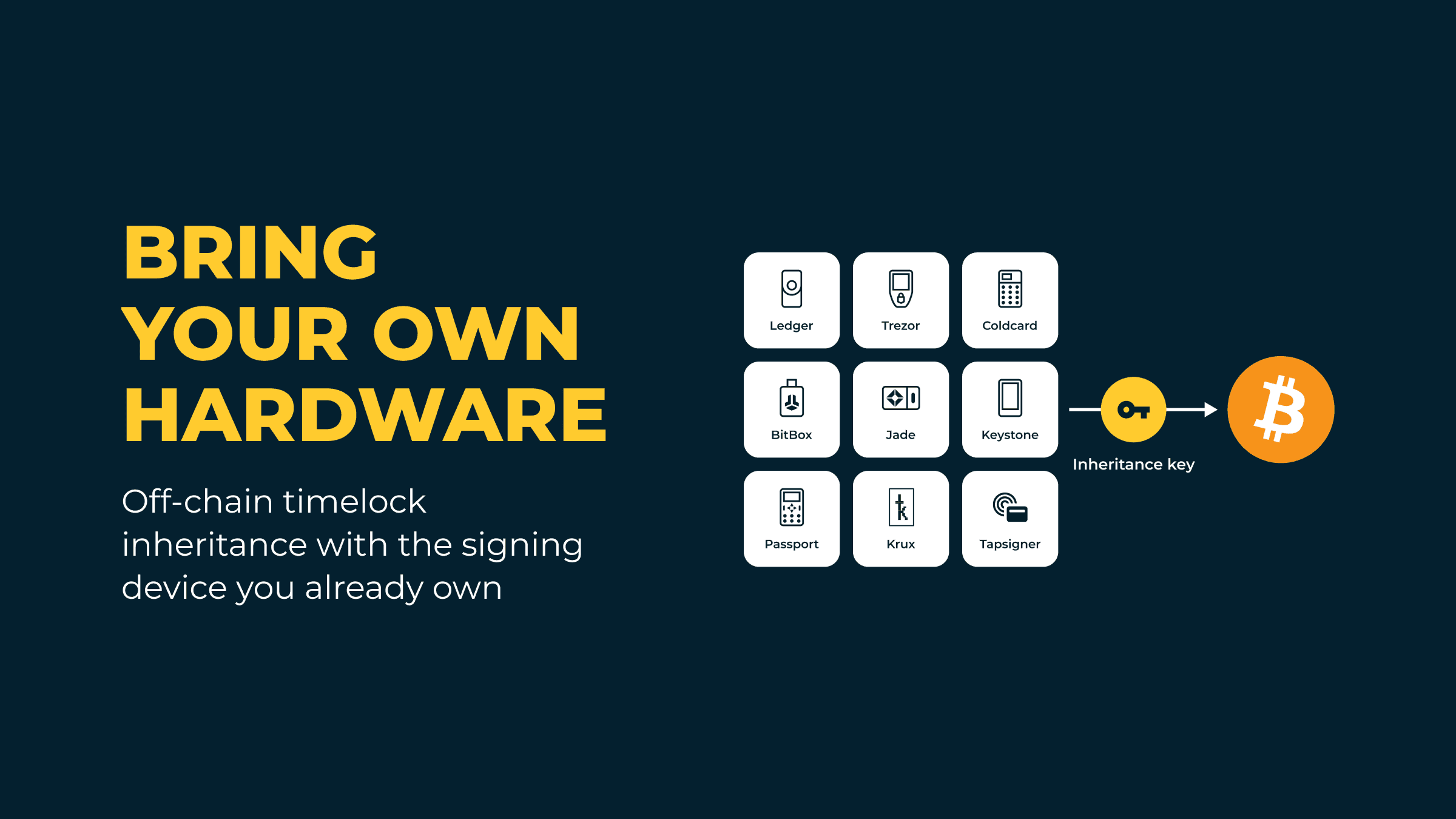
The hardest part of Bitcoin inheritance is often the heir, not the setup. Nunchuk's inheritance protocols are built so your Beneficiary can claim with a few English words and a key, guided by the app, without knowing anything about multisig. This update brings the off-chain (Flexible) protocol to the hardware signing device you already own.
What's new
Nunchuk's off-chain timelock inheritance protocol now works with the hardware signing device you already own. The inheritance key no longer has to be a Tapsigner or Coldcard, and its backup no longer has to be stored with Nunchuk.
This post covers the off-chain (Flexible) timelock protocol, where Nunchuk's platform key enforces the date. Nunchuk's on-chain autonomous protocol, built on Miniscript, enforces the timelock on the Bitcoin network itself and already supports bringing your own hardware. It is not covered here.
The update changes three things:
- Bring your own hardware. Ledger, Trezor, BitBox, Blockstream Jade, Keystone, Foundation Passport, Krux and generic air-gapped signers join Tapsigner and Coldcard as inheritance keys. Because a Beneficiary can now prove control by signing, rather than only by decrypting a backup, far more hardware can serve as the inheritance key.
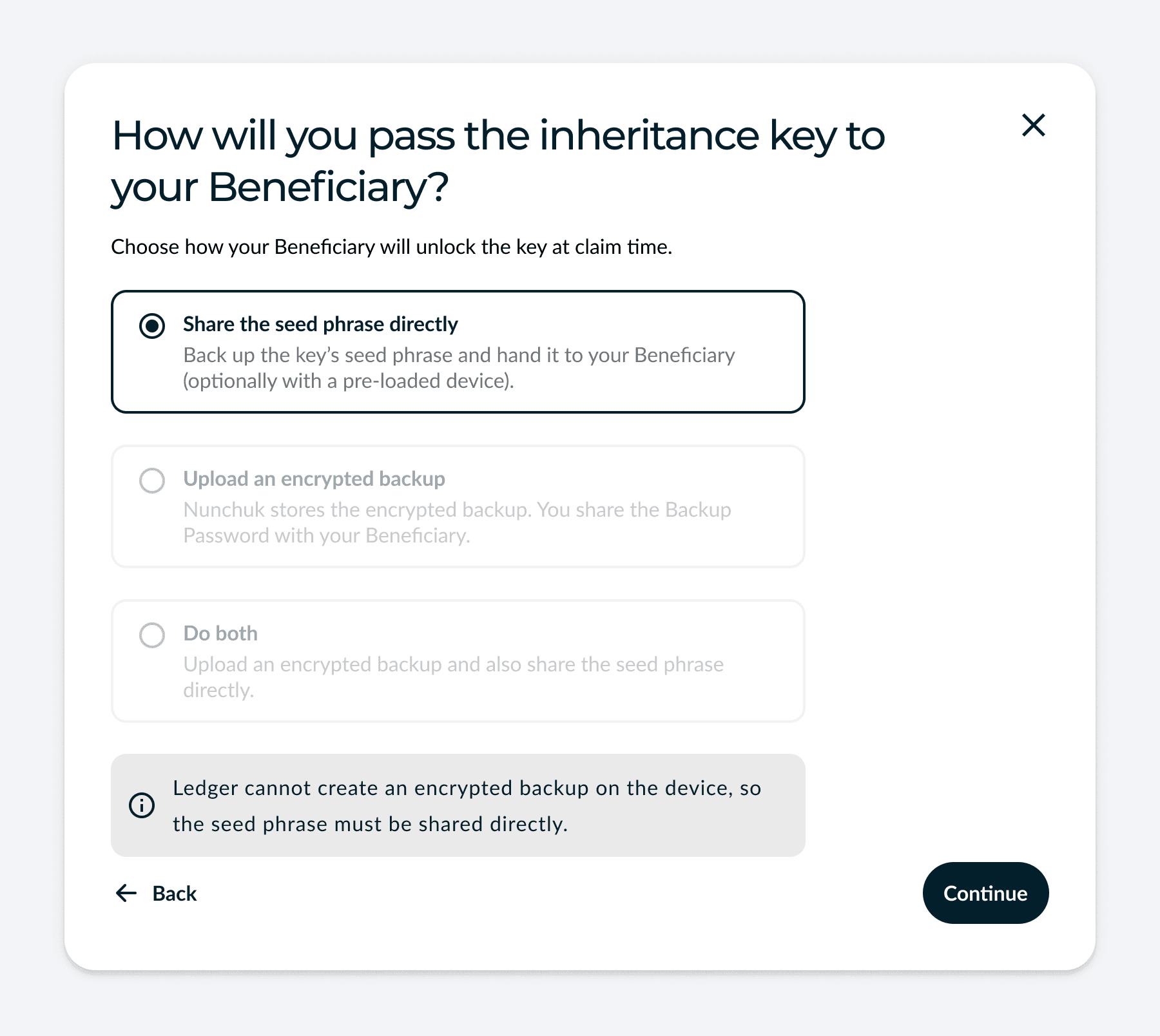
- You choose how the key reaches your Beneficiary. Share the seed phrase directly, upload an encrypted backup, or do both.
- A Beneficiary holding the inheritance key needs no Backup Password. They prove control by signing a short claim message with the device. The Backup Password route stays for plans that include an encrypted backup.
What stays the same: the Magic Phrase that identifies your plan, the off-chain timelock, the optional buffer period and notifications, the choice between direct, indirect and joint control, and Phased Rollout for splitting the inheritance among several heirs.
Bring-your-own-hardware support needs Nunchuk app version 2.9.0 or later.
Already a subscriber? To switch your inheritance key to a different type of hardware, use Key Replacement in the Nunchuk mobile app: Wallet > More menu > View wallet config > More menu > Replace key. When the key you replace is the inheritance key, the app asks you to set up the inheritance plan again afterwards.
Built for a Beneficiary who isn't technical
Your Beneficiary does not need to understand multisig, wallet files or derivation paths to claim. Every part of the claim is designed around that.
- They start with words, not files. A short Magic Phrase finds the plan, and Nunchuk restores the wallet for them, so there is nothing to rebuild.
- One key is enough. They bring the inheritance key and Nunchuk's platform key provides the second signature. (Plans with two inheritance keys, such as Honey Badger Premier, need both.)
- No wallet expertise needed. They do not need to know how bitcoin wallets work. If they are comfortable bringing their own hardware signing device for extra security, that works too.
- The app asks only what applies. Choices that do not fit their plan or device are skipped, and each hardware signing device comes with its own step-by-step instructions.
- They hear when it is time. Optional emails tell them when the timelock expires, and your personal note appears once they claim.
- Someone can claim for them. With indirect inheritance, a Trustee you choose claims on their behalf.
- They choose where the bitcoin goes. They can withdraw straight to an exchange account or to a Bitcoin wallet they own. If they do not have a wallet yet, the app can create one for them in a single step.
- Help is a message away. If they run into any issue, they can chat with Nunchuk support directly in the app.
How the protocol works
An off-chain timelock inheritance plan protects a Nunchuk assisted wallet. The standard wallet is a 2-of-4 multisig: three hardware keys you hold, one of which you designate as the inheritance key, plus Nunchuk's platform key. Larger plans, such as Honey Badger Premier, use a 3-of-5 multisig with two inheritance keys. This post describes the standard plan and notes the few places where a second inheritance key changes something.
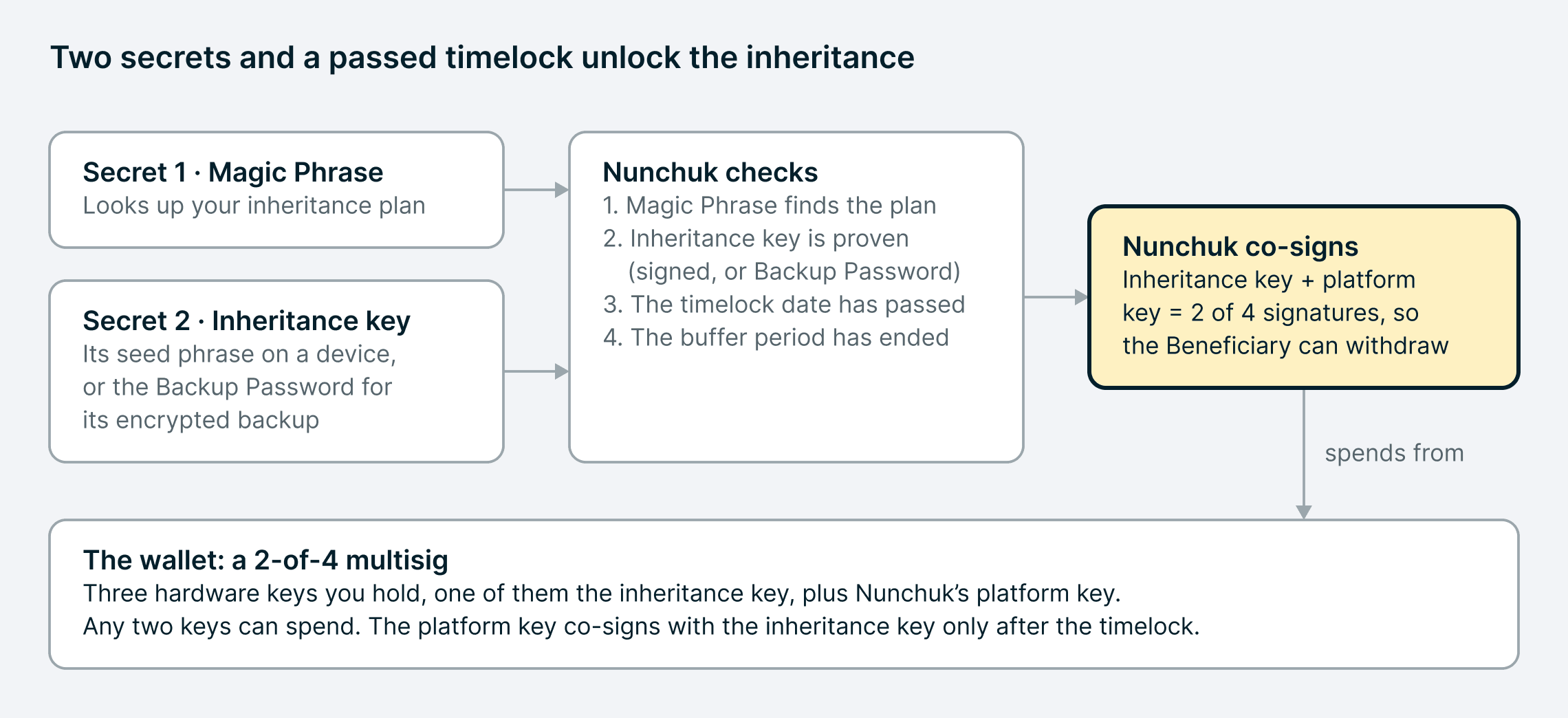
The timelock is enforced off-chain. Nunchuk's platform key co-signs with the inheritance key only on or after a date you choose, so before that date nobody can claim, even with every secret. Because the date and the rest of the plan live in Nunchuk's co-signing policy rather than in the wallet's script, you can change them later, including the number of heirs or the distribution schedule, without moving your funds. Meanwhile you keep spending with your own keys as usual.
| Secret | What it does | Where it comes from |
|---|---|---|
| Magic Phrase | Identifies your plan. The Beneficiary enters it to start a claim. | Generated when you set up the plan |
| Inheritance key | Proves the claim and, with the platform key, signs the withdrawal | A hardware key you designate |
| Seed phrase backup | Restores the inheritance key onto any compatible device | Written down from your device. Nunchuk's servers never receive it. |
| Backup Password | Decrypts the encrypted backup that Nunchuk stores | Set on, or shown by, your device when you create the backup |
Anyone who holds both the Magic Phrase and the inheritance key can claim once the timelock passes. That is why the two are always stored apart, and why the rest of the setup is about who receives which secret.
Step 1: Pick your inheritance key
When you configure a new assisted wallet, you add three hardware keys and mark one of them as the inheritance key. Nunchuk provisions the platform key, and you decide how it behaves through its co-signing policies.
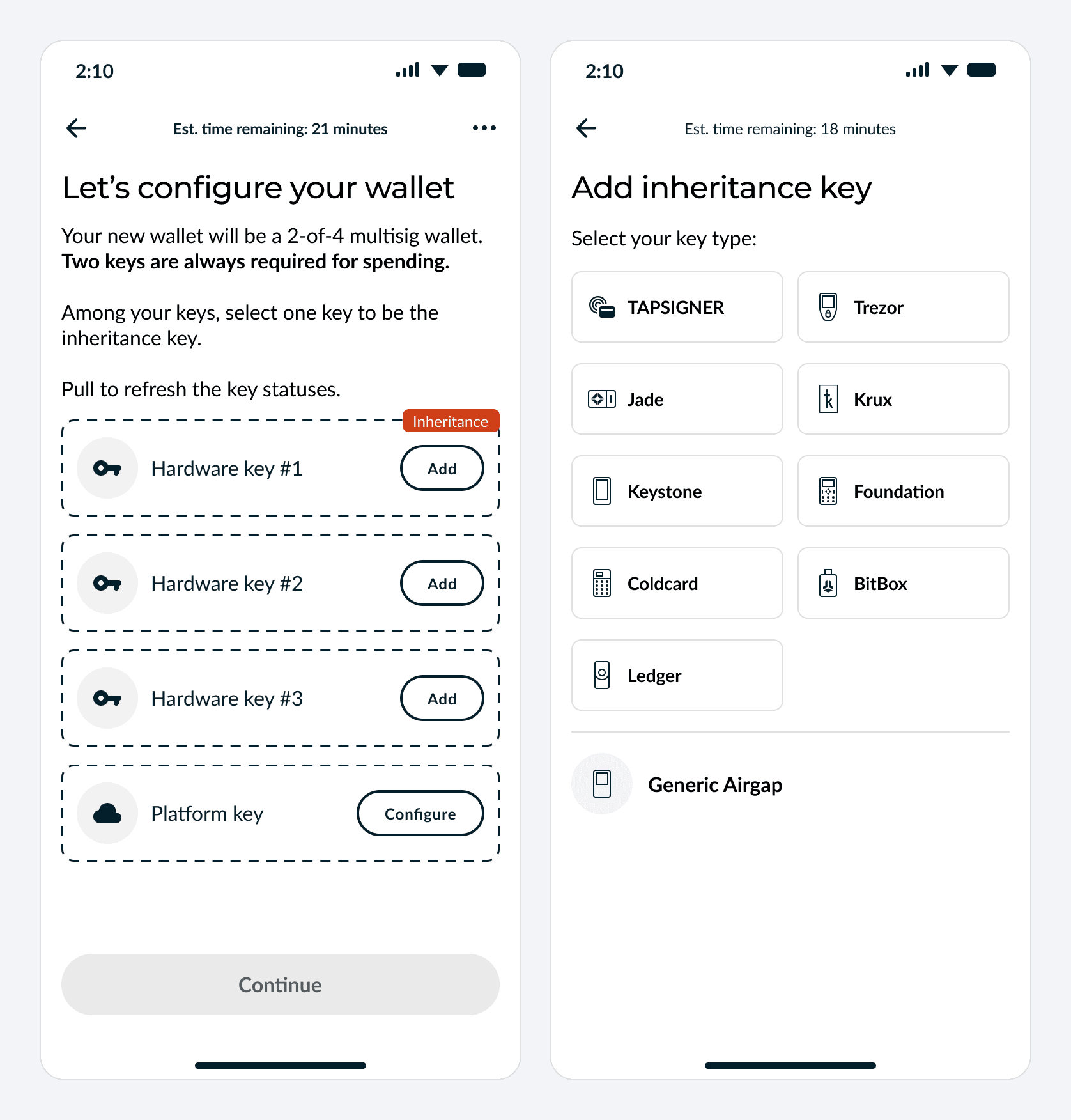
The inheritance key should be a device you set aside. Use it for everyday spending only as a last resort, and keep it somewhere safe. A software key on your phone cannot be the inheritance key: it has to live on separate, dedicated hardware.
| Device | How it connects | Encrypted backup supported by Nunchuk today |
|---|---|---|
| Tapsigner | NFC | Yes, and it is the only route (Tapsigner has no seed phrase) |
| Coldcard | NFC, QR, USB or microSD | Yes: seed phrase, encrypted backup, or both |
| Ledger | Bluetooth, or USB on Android and desktop | No: seed phrase only |
| Trezor | Trezor Suite app, or USB on desktop | No: seed phrase only |
| BitBox02 | Bluetooth (BitBox02 Nova) or USB-C | No: seed phrase only |
| Keystone | QR | No: seed phrase only |
| Blockstream Jade | QR, or USB on desktop | No: seed phrase only |
| Foundation Passport | QR or microSD | No: seed phrase only |
| Krux | QR to add, microSD card to sign | No: seed phrase only |
| Other air-gapped signers | QR or file | No: seed phrase only |
Every device comes with its own tailored instructions, so you know exactly what to prepare, from installing the Bitcoin app on a Ledger to exporting the right multisig XPUB from a Jade or Krux. You can also reuse a key that is already in your Nunchuk account.
Why not every device qualifies. Every inheritance key must be able to sign a message with the wallet's multisig key, because your Beneficiary proves they hold the key by signing. Every supported device except Tapsigner must also load a standard BIP39 seed phrase (12 or 24 words, and 12 is enough); Tapsigner uses its existing encrypted-backup flow instead. A device that cannot sign such a message could never be used to claim, so it is not offered.
A note on passphrases. A passphrase is an optional extra word added to a seed phrase. Nunchuk strongly advises against using one on the inheritance key, because it complicates recovery and raises the risk of error for your Beneficiary. If you use one anyway, you must share it with your Beneficiary along with the seed phrase backup.
Step 2: Decide how the key reaches your Beneficiary
You choose how your Beneficiary will get the inheritance key: through its seed phrase, an encrypted backup, or both. The options depend on your device, because Nunchuk currently supports encrypted backups for Tapsigner and Coldcard, with support for more devices in progress. This choice is new: before, every plan relied on an encrypted backup.
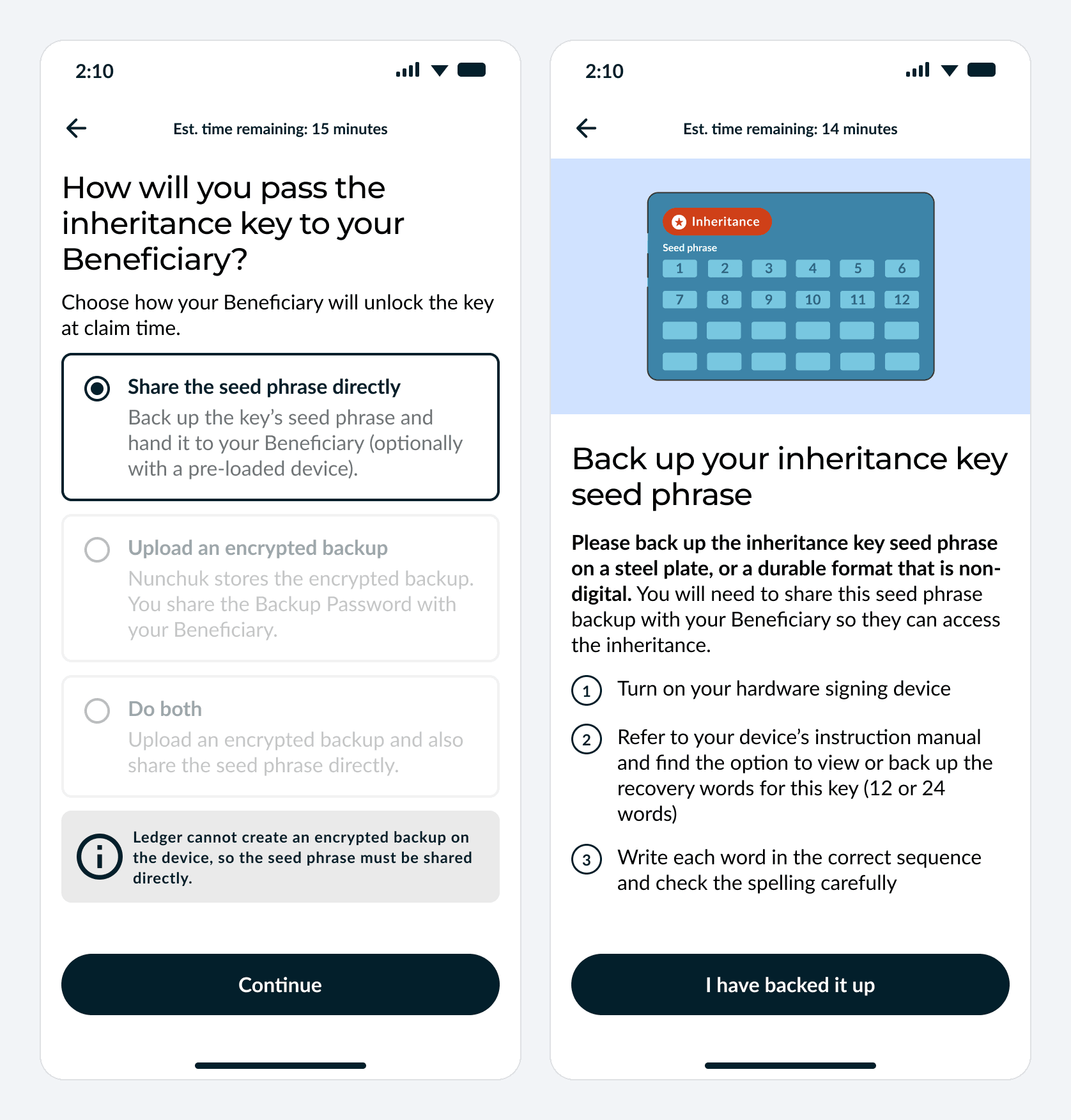
| Option | What you do | What your Beneficiary receives | What Nunchuk stores |
|---|---|---|---|
| Share the seed phrase directly | Write the inheritance key's 12 or 24 words on steel or another durable, non-digital medium | The seed phrase backup, optionally with a device already loaded with it | No key backup |
| Upload an encrypted backup | Create an encrypted backup on the device and upload it | The Backup Password | The encrypted backup, which only the Backup Password opens |
| Do both | Both of the above | Either route works on its own | The encrypted backup |
Most devices use the seed phrase. Ledger, Trezor, BitBox, Keystone, Jade, Passport, Krux and other air-gapped signers use the seed phrase route with Nunchuk today. No encrypted backup is needed. Your Beneficiary will need the Magic Phrase and the inheritance key's seed phrase backup. The app greys out any option your device cannot use and explains why.
If you use a Coldcard or Tapsigner. A Coldcard supports both routes, so you can add an encrypted backup alongside the seed phrase. That gives your Beneficiary a second way in, because a seed phrase and an encrypted backup fail for different reasons; it is optional. A Tapsigner has no seed phrase, so it always uses the encrypted backup.
Creating the encrypted backup. Tapsigner and Coldcard keep the backup flows they use today, and you record the Backup Password. Where it lives depends on the device:
- Tapsigner: printed on the back of the card, sometimes labelled "Backup key".
- Coldcard: the 12 words shown when you created the backup file.
Step 3: Verify the backup
Nunchuk asks you to test each backup before you rely on it. With your own hardware, that means restoring the inheritance key, not taking a word quiz.
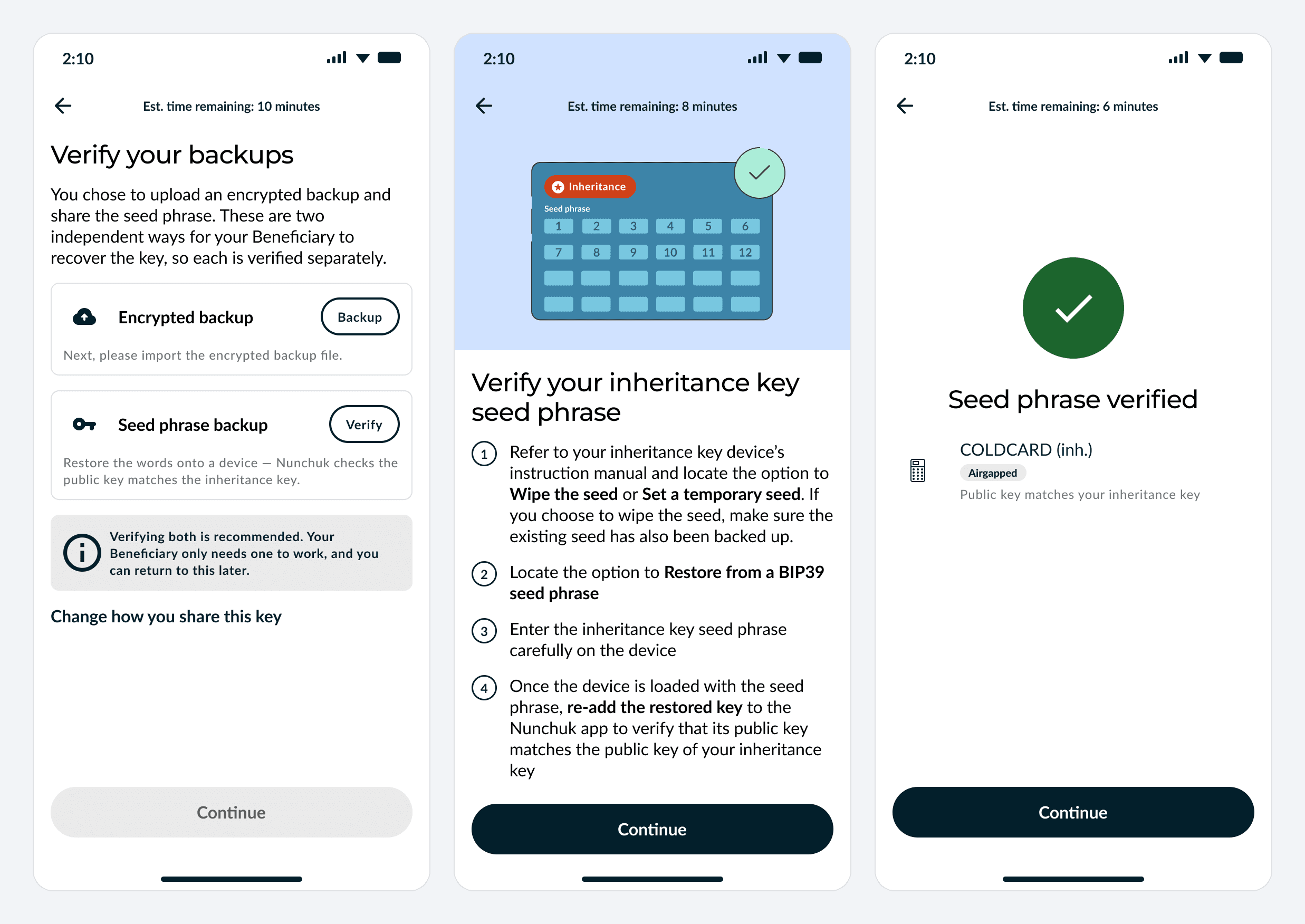
Why there is no word quiz. During setup, Nunchuk only receives the inheritance key's public key, never its seed phrase. So the app cannot check your backup by asking you for specific words from it. Instead, you restore the seed phrase onto a device and re-add the key, and Nunchuk checks it against the inheritance key you added originally. A match confirms your seed phrase backup is correct.
How the restore check works.
- On the inheritance device, wipe the seed or load a temporary one. If you wipe it, make sure the existing seed is backed up first.
- Restore from your written BIP39 seed phrase.
- Re-add the restored key to Nunchuk. The app already knows the device type, so it only asks how to connect.
- Nunchuk checks the restored key against your inheritance key. If they do not match, you can check the backup and try again.
Checking the encrypted backup. You can verify it yourself or through the app, which checks that the backup stored with Nunchuk decrypts with the Backup Password you recorded.
Skipping is allowed, but never silent. Verification is optional, so you can choose to skip it and come back later; until you do, your wallet setup keeps showing the inheritance key as unverified. Skipping only skips the check. Any required backup must still be created. If you chose an encrypted backup, it must also be uploaded.
Step 4: Set up the plan
Once the wallet exists, you set up the plan itself: its Magic Phrase, the timelock date, and how Nunchuk should behave at claim time. It takes a few minutes.
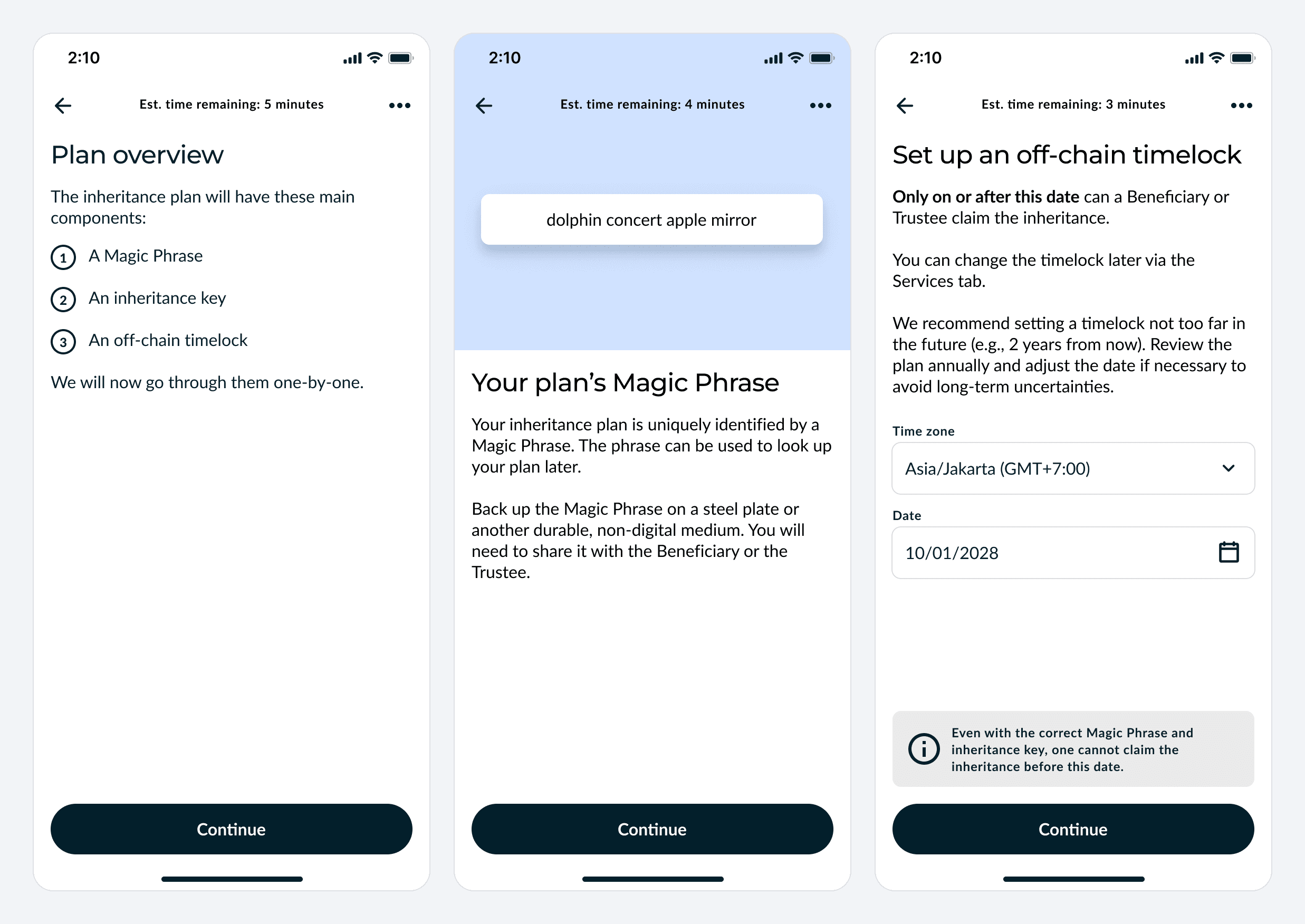
- Magic Phrase. Nunchuk generates a short phrase that uniquely identifies your plan. Back it up on steel or another durable, non-digital medium; you will share it with your Beneficiary or Trustee.
- The inheritance key. The app reminds you which route you chose. With an encrypted backup, you record the Backup Password. With the seed phrase route, you keep the written backup for your Beneficiary. You can also hand over the device itself, but electronics fail, so the seed phrase should also exist on steel or another medium that lasts decades.
- Off-chain timelock. Pick the date, and time zone, on or after which a claim can succeed. Nunchuk suggests a date not too far out, such as two years, reviewed once a year. You can change it later from the Services tab.
- A message (optional). Your Beneficiary sees it after they claim.
- Buffer period. Extra time between a claimant presenting the secrets and the funds being claimable: 7 days, 30, 90 or 180 days, or none. Nunchuk emails you when a buffer period starts, which gives you time to react to a claim you did not authorize.
- Notifications (optional). Nunchuk can email your Beneficiary or Trustee when the timelock expires. The emails never include the secrets.
- Authorize. Because the plan changes how the wallet can be spent, Nunchuk asks you to approve it with your own keys, usually by signing a dummy transaction that moves no funds.
Step 5: Share your secrets
The last step is handing the secrets to the right people, and you decide who that is.
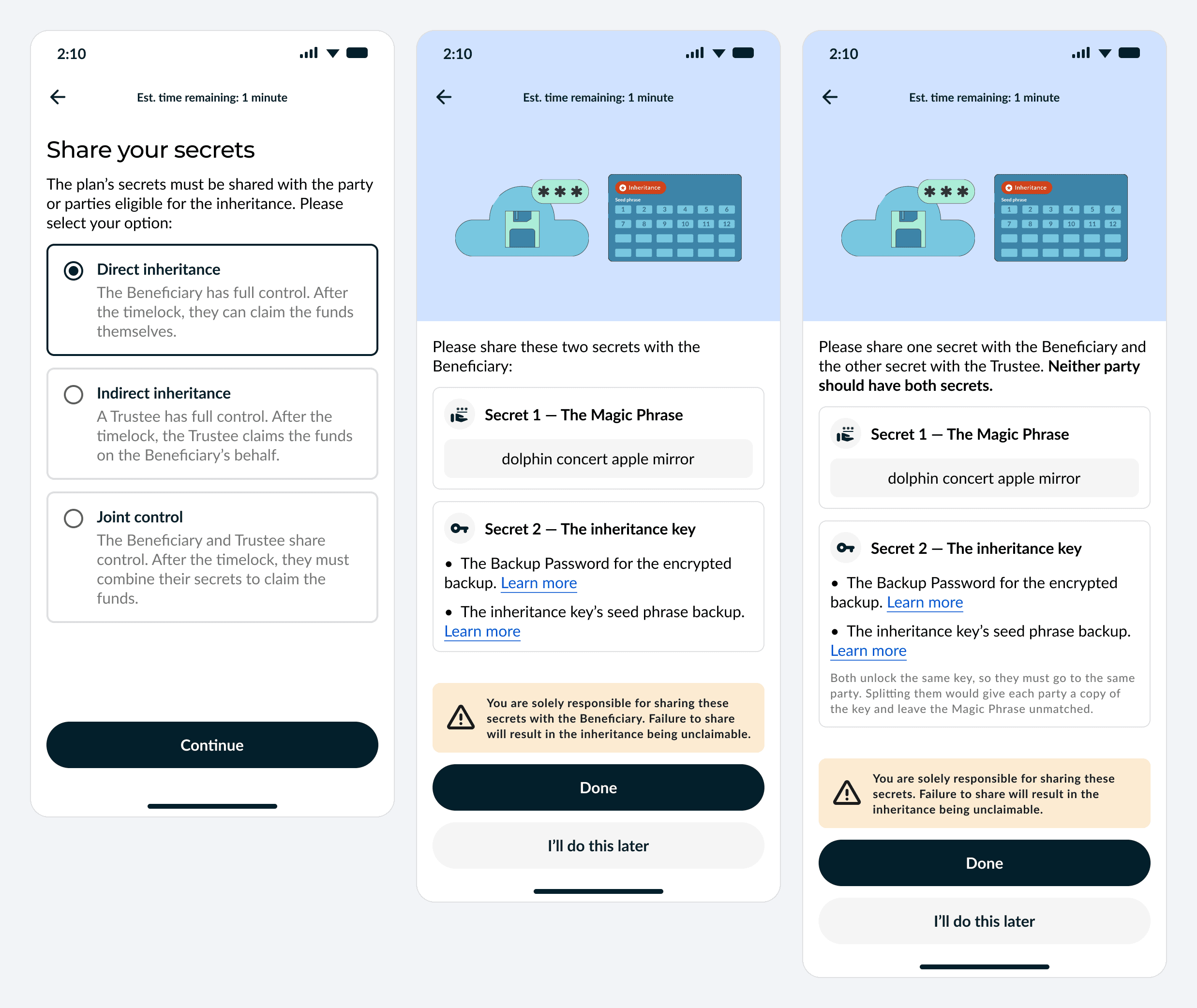
| Setup | Who holds the Magic Phrase | Who holds the inheritance key | Who claims |
|---|---|---|---|
| Direct inheritance | Beneficiary | Beneficiary | The Beneficiary, after the timelock |
| Indirect inheritance | Trustee | Trustee | The Trustee, on the Beneficiary's behalf |
| Joint control | One of the two parties | The other party | Both together; neither can claim alone |
When you use both routes. This applies only if your inheritance key's device supports both a seed phrase and an encrypted backup, and you chose both. The seed phrase and the Backup Password are then two ways into the same inheritance key, so under joint control they must go to the same party. Splitting them would hand each party a working key and leave the Magic Phrase unmatched, which defeats the point.
This step is yours alone. Nunchuk does not deliver the secrets, and its emails never contain them. If they are never shared, the inheritance cannot be claimed. You can do this later: the plan summary keeps a Share your secrets button.
Step 6: Review your plan any time
The plan summary shows, on one screen, exactly what your Beneficiary will need and when it becomes usable. You review it before authorizing, and you can reopen it whenever you like. You can also update your inheritance plan at any time from the Services tab, without moving your funds. This includes the timelock date, the note to your Beneficiary, the buffer period and notification settings, and, with Phased Rollout, the number of heirs and the distribution schedule. Security-sensitive changes, such as moving the timelock to an earlier date, shortening the buffer period, or changing heirs or the distribution schedule, must be approved with your own keys. Smaller changes, such as updating your note or notification settings, may only ask you to answer a Security Question.
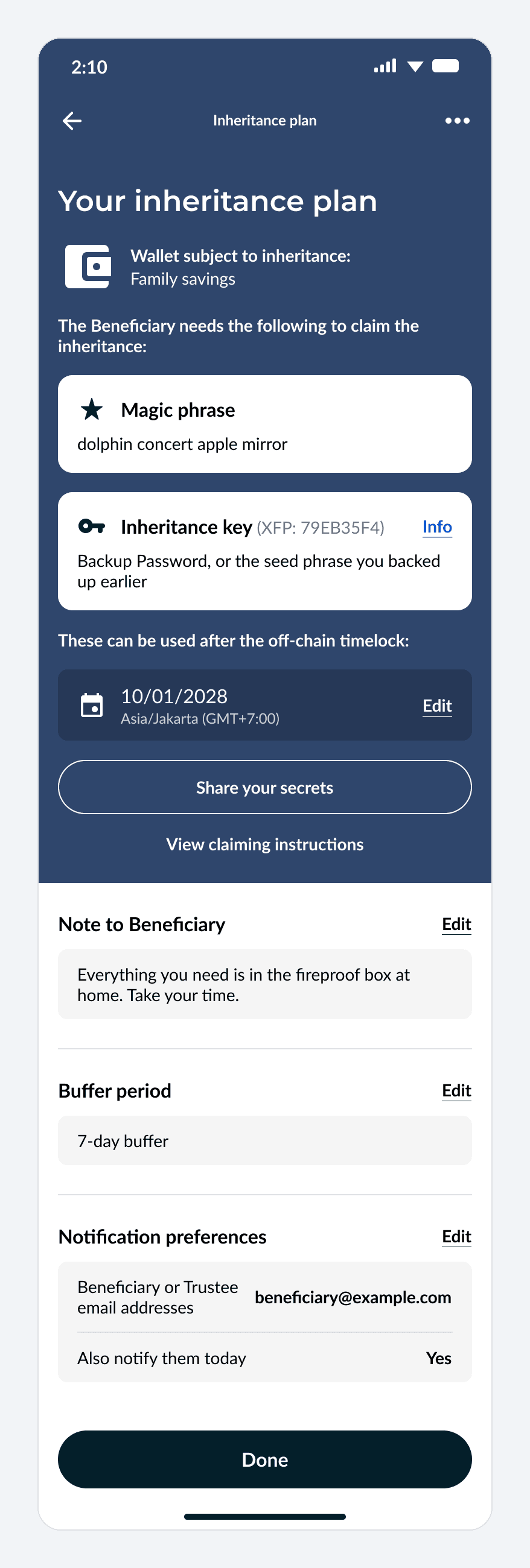
It lists:
- What the Beneficiary needs: the Magic Phrase, and the inheritance key identified by its fingerprint (XFP), reachable by "Backup Password, or the seed phrase you backed up earlier".
- When: "These can be used after the off-chain timelock", with the date and time zone, and an Edit link.
- Your settings: the note to your Beneficiary, the buffer period and notification preferences, each editable.
- Two shortcuts: Share your secrets, and View claiming instructions, which shows what your Beneficiary will go through.
More than one heir: Phased Rollout
The off-chain protocol can also split the inheritance across several beneficiaries and release each share on its own schedule. This is Phased Rollout, and it runs only on the off-chain protocol.
- Shares by percentage. Each beneficiary gets a fixed share of the whole inheritance, for example 60% and 40%.
- Staged releases. A share can unlock in stages, each with its own date, adding up to 100%.
- A Magic Phrase per heir. Each beneficiary looks up the plan with their own Magic Phrase, but all of them need access to the same inheritance key.
- Unclaimed shares. You choose whether an unclaimed share stays in the wallet or is redistributed, after a period of inactivity or on a set date.
- Adjustable. Because it is off-chain, you can change the plan and its dates as often as you need without moving funds.
Phased Rollout is available to Honey Badger and Byzantine subscribers. It arrived in Nunchuk app 2.6, but using it with your own hardware needs version 2.9.0 or later.
How your Beneficiary claims
The claim is a guided, step-by-step flow in the Nunchuk app, with chat support if your Beneficiary needs help. Your Beneficiary starts with the Magic Phrase, proves they hold each inheritance key, and then withdraws. A claim can only complete on or after the timelock date.
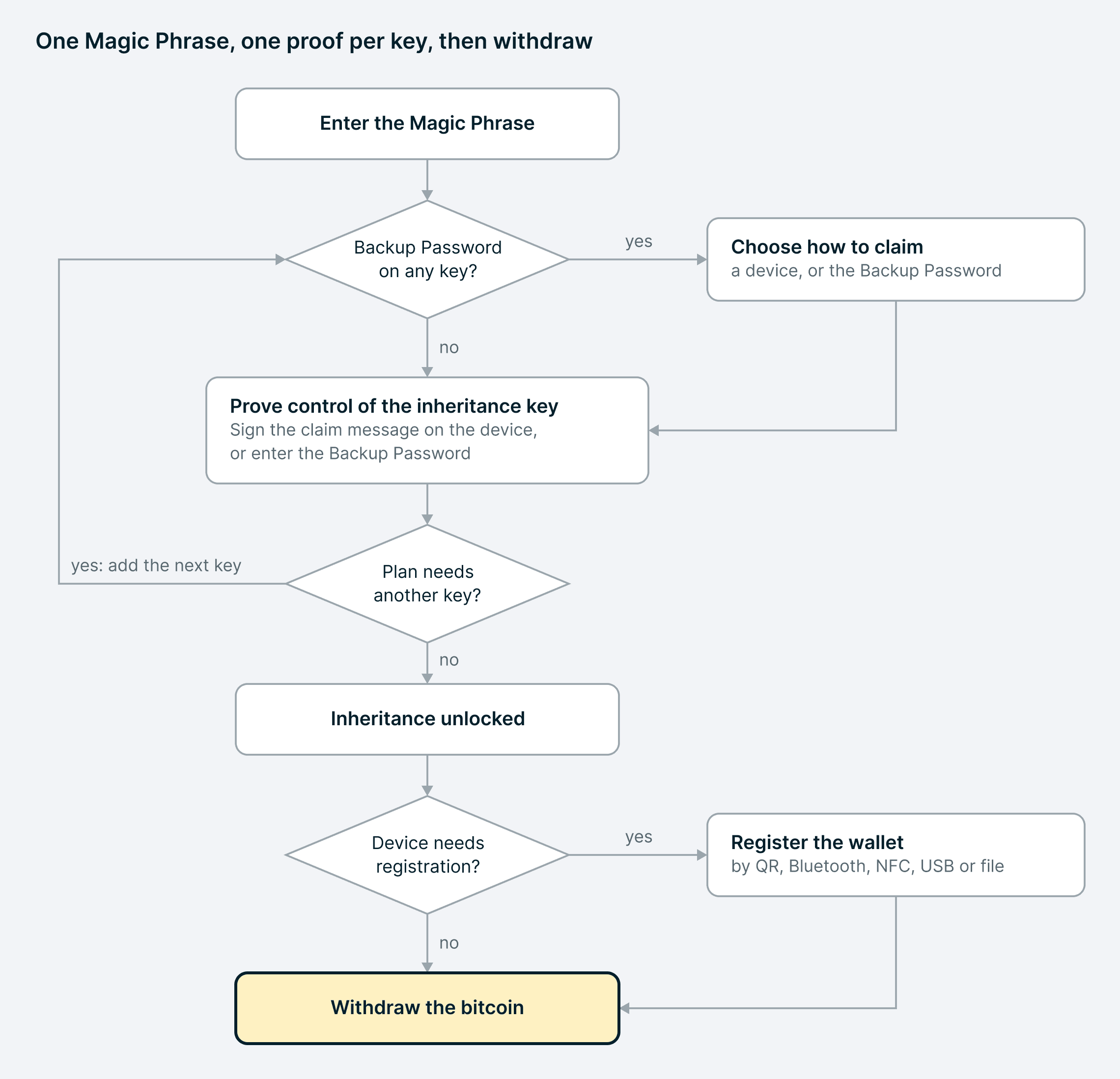
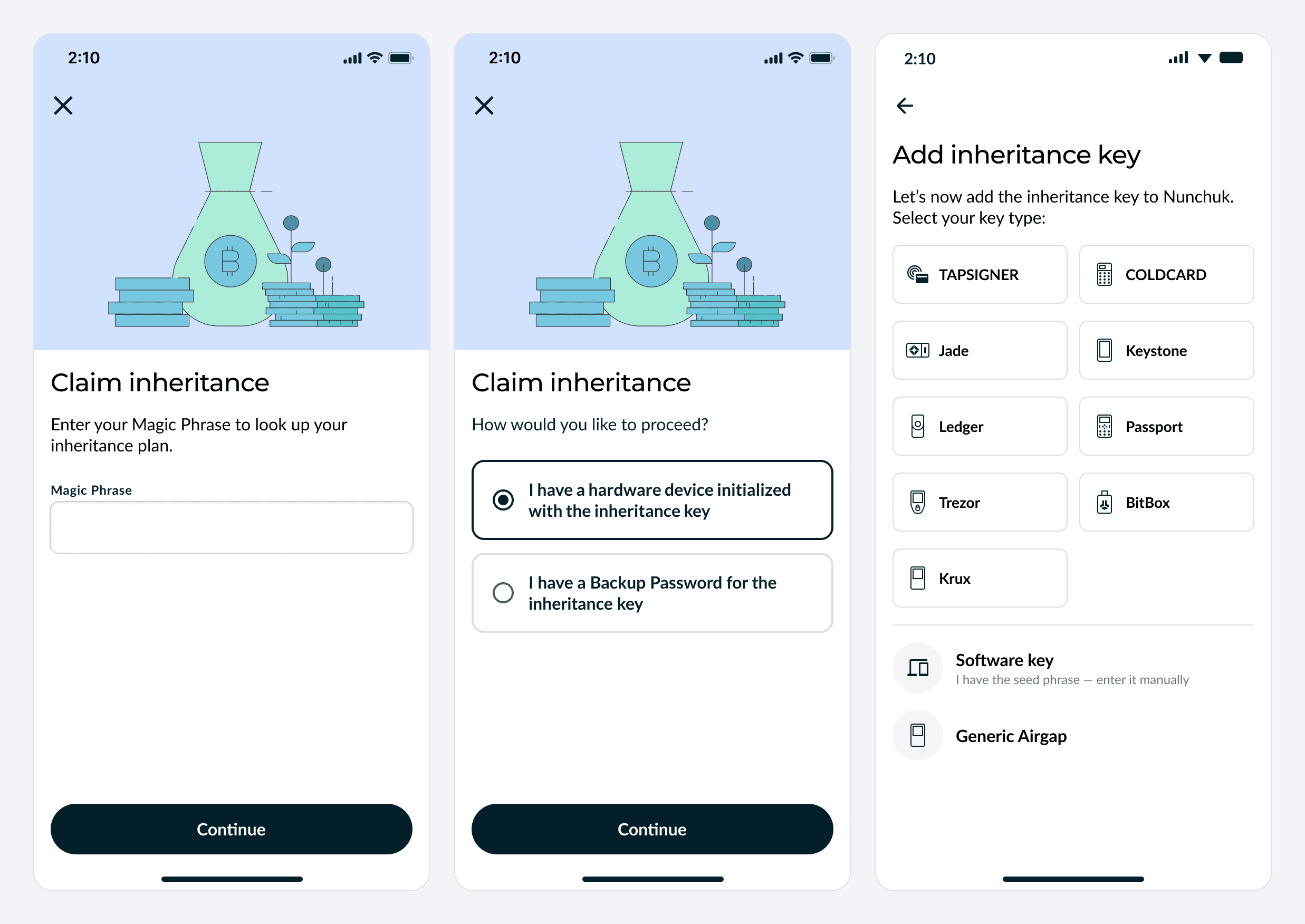
- Enter the Magic Phrase. From Services, choose Claim an inheritance. The phrase looks up the plan.
- Choose a route. If any inheritance key in the plan has an encrypted backup, the app asks whether the Beneficiary has a device with the inheritance key or a Backup Password. If not, it goes straight to adding the inheritance key.
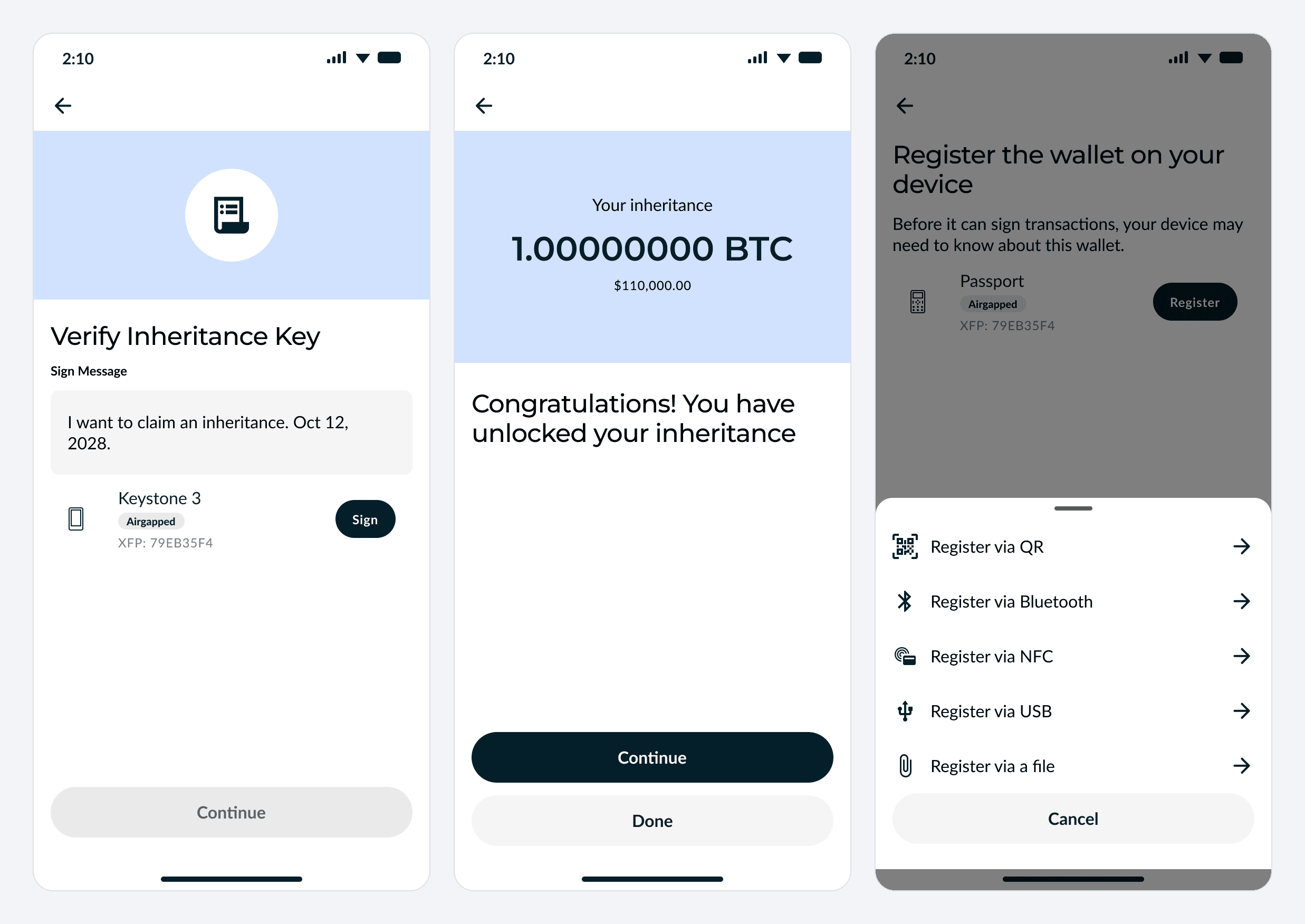
- Prove the inheritance key with a device. They pick the device type, add it, and sign the message generated by Nunchuk. The signature proves control without the inheritance key ever leaving the device. Bringing their own hardware is the more secure option, but the app also supports recovering the inheritance key locally as a Software key.
- Or prove it with the Backup Password. They type it in, and the app decrypts the encrypted backup.
- Repeat for a second key. Plans with two inheritance keys ask for the next one. Prove control of each inheritance key; a Backup Password can also be used for any key with an available encrypted backup.
- Unlocked. The app shows the inheritance and its balance.
- Register the wallet, if needed. Some hardware must be told about a multisig wallet before it will sign for it. Nunchuk works out whether that applies and offers the methods the device supports.
- Withdraw. The inheritance key signs, Nunchuk's platform key co-signs, and the bitcoin moves.
On desktop
Setup always starts in the Nunchuk mobile app. Once it has begun, you can add any of the wallet's keys, including the inheritance key, from the desktop app. That is also how you add hardware that needs a USB connection.
The desktop picker offers Ledger, Trezor, Coldcard, Blockstream Jade and BitBox; other key types are added from the mobile app. Several devices work in both apps, so pick the one that matches how you want to connect. A Ledger connects over Bluetooth on mobile (or USB on Android) and over USB on desktop; a Coldcard by NFC or QR code on mobile and USB on desktop; a Jade by QR code on mobile and USB on desktop.
The distribution choice and the seed phrase check work the same way on desktop. Verifying an encrypted backup is finished in the mobile app.
Security model
No single secret, and no single party, can take the inheritance early. A claim needs the Magic Phrase, control of the inheritance key, and a date past the timelock. Spending requires two signatures for a 2-of-4 wallet or three for a 3-of-5 wallet.
| Item | What it can do on its own | What it cannot do |
|---|---|---|
| Magic Phrase | Look up the plan | Sign anything or move funds |
| Inheritance key | Sign as one of the wallet's keys | Spend alone: every spend needs more signatures |
| Encrypted backup | Nothing without the Backup Password | Reveal the inheritance key |
| Backup Password | Decrypt the encrypted backup | Anything without the backup itself |
| Nunchuk | Co-sign with the inheritance key after the timelock; store the encrypted backup | Receive your seed phrase, decrypt your backup, or move funds with its one key |
Nunchuk's servers never receive your seed phrase. With the seed phrase route, the words go from your device to paper or steel. With an encrypted backup, Nunchuk stores a file it cannot open.
The inheritance key is a full signer. In a 2-of-4 wallet, together with any one of your everyday keys, it can spend without Nunchuk. That is what makes it a useful emergency backup, and why it deserves the same care as your other keys: stored safely, and apart from the Magic Phrase. In a 3-of-5 plan with two inheritance keys, a claim needs control of both.
If the seed phrase leaks. Handing over a seed phrase without encryption raises the chance it leaks during your lifetime. A leaked inheritance key alone still cannot withdraw your funds. An attacker would also need the Magic Phrase and then have to wait out the timelock. Or they would need a second hardware key plus your Nunchuk account and/or the wallet configuration file, which means getting past at least two more layers of security. That is why the seed phrase and the Magic Phrase should always be kept apart.
You get warning. With a buffer period, Nunchuk emails you when a claim starts, and the funds stay locked until the period ends.
FAQ
Does my Beneficiary need to be technical? No. They need the Magic Phrase and the inheritance key, and the Nunchuk app guides them through each step. Nunchuk restores the wallet for them, and if they get stuck, they can chat with Nunchuk support directly in the app.
Which hardware wallets can be an inheritance key? Tapsigner, Coldcard, Ledger, Trezor, BitBox02, Blockstream Jade, Foundation Passport, Keystone, Krux, and other air-gapped signers. The device must be able to sign messages with the wallet's multisig key, and every device except Tapsigner must load a BIP39 seed phrase.
Which hardware wallets can be used as a non-inheritance key? Every device Nunchuk supports, including SeedSigner and Portal: Tapsigner, Coldcard, Ledger, Trezor, BitBox02, Blockstream Jade, Foundation Passport, Keystone, Krux, Portal, SeedSigner, and other air-gapped signers. Your other keys only sign transactions, so unlike the inheritance key they never need to prove control by signing a message.
Does Nunchuk receive my seed phrase? No. Nunchuk's servers hold the inheritance key's public information and, for a Tapsigner or Coldcard backup, an encrypted file that only the Backup Password opens.
Is it risky to give my Beneficiary the seed phrase now? It raises the chance of a leak during your lifetime, but the inheritance key alone cannot move your funds; see Security model above. Keep it apart from the Magic Phrase.
What does my Beneficiary need to claim? The Magic Phrase and the inheritance key, which means a device holding it, its seed phrase, or the Backup Password. The claim completes only on or after the timelock date.
What if my Beneficiary does not own a hardware wallet? Hand them a device already loaded with the inheritance key, or rely on the Backup Password if you uploaded an encrypted backup. If they are comfortable with hardware signing devices, they can also load the seed phrase onto their own device. The app also supports recovering the inheritance key locally as a Software key, though bringing their own hardware is more secure.
Can someone claim before the timelock? No. Nunchuk's platform key will not co-sign a claim before the date, even with every secret. A buffer period adds more time, and you are emailed when it starts.
Do I have to share both the seed phrase and the Backup Password? No. Either one is enough, and today only Coldcard offers both. If you use both, give them to the same person.
What is the difference between direct, indirect and joint control? Direct: your Beneficiary holds every secret. Indirect: a Trustee holds them and claims on the Beneficiary's behalf. Joint control: one party holds the Magic Phrase and the other holds the inheritance key, so neither can claim alone.
Can I leave the inheritance to more than one person? Yes. With Phased Rollout, each beneficiary gets a percentage share and their own Magic Phrase, and each share can be released in stages over the years.
What if Nunchuk is unavailable? If the service is down temporarily, a claim fails and your Beneficiary can simply try again later. If Nunchuk shut down for good, claims could not go through, because every claim needs the platform key's signature. You stay in control either way: your own keys can spend without Nunchuk, so you can move your funds to a new setup at any time. Because Nunchuk wallets are built on open standards, you can even recover yours in compatible software such as Sparrow, using the wallet configuration file and enough of your own keys to meet the signing threshold (step-by-step guide). For an inheritance that does not depend on Nunchuk at all, Nunchuk offers the on-chain autonomous protocol, which the Bitcoin network enforces directly.
How is this different from Nunchuk's on-chain timelock inheritance? The off-chain protocol enforces the plan through Nunchuk's platform key, so the date and other plan details, such as the number of heirs or the distribution schedule, can change without moving funds. The on-chain protocol, built on Miniscript, writes the timelock into the wallet itself and already supports bringing your own hardware. This post covers only the off-chain protocol.
Can I change the timelock date later? Yes, from the Services tab, without moving funds. Moving it to an earlier date must be approved with your own keys.
Should I use a passphrase on the inheritance key? Preferably not, since it makes recovery harder for your Beneficiary. If you do, share it along with the seed phrase backup.
Can I use the desktop app? Yes, once setup has been started on mobile. From then on, any key, including the inheritance key, can be added from the desktop app, which is how keys that need USB are added. Desktop supports BitBox, Coldcard, Jade, Ledger and Trezor; some of these also work on mobile over Bluetooth, NFC or QR.